


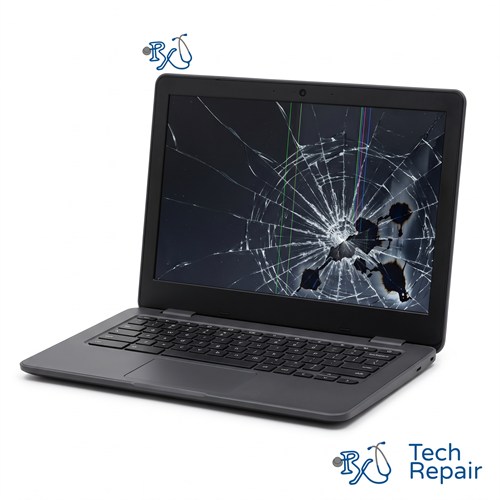
Chromebook Screen Repair
Cracked, shattered or blank Chromebook screen? RxTech Repair replaces Chromebook screens in Mission Viejo, CA, including standard LCD screens, touch screens and 2-in-1 displays. We work on HP, Lenovo, Acer, Dell, Samsung, ASUS and Google Chromebooks. Diagnosis is free, and you'll get a price before we start.
Screen Types: Non-touch LCD, touch screen and 2-in-1 display assemblies
Diagnosis: Free
Warranty: 1 year on parts and labor
Chromebook Screen Replacement in Mission Viejo
A broken screen is the most common Chromebook repair we do. Chromebooks get dropped, sat on, and closed with a pencil or earbuds left on the keyboard, and any of those can crack the screen. Whether you have a small crack in the corner or a display that's completely black, a screen replacement will get your Chromebook working like new again.
Signs your Chromebook needs a new screen
- Cracked or shattered glass, or a spiderweb pattern spreading from one spot
- Black ink-like spots, bleeding colors or a dark patch that grows over time
- Vertical or horizontal lines across the display
- A black screen even though the keyboard backlight or power light turns on
- Flickering, or a picture that only shows at certain lid angles
- A touch screen that doesn't respond, or that taps on its own ("ghost touch")
Chromebook Screen Replacement Prices
The price depends on which of three kinds of screen your Chromebook has:
| Screen type | Price |
| Standard non-touch screen Most school and everyday 11.6", 14" and 15.6" Chromebooks | $99 - $119 |
| Touch screen, standard laptop Touch screen Chromebooks with a plastic border around the screen that don't fold into a tablet | $129 - $149 |
| 2-in-1 and premium Chromebooks Convertibles such as the HP Chromebook x360, Lenovo Flex and Yoga, Acer Chromebook Spin and ASUS Chromebook Flip, and premium models with edge-to-edge glass | $169 - $249+ |
Every price includes the screen, installation and a 1-year warranty. Send us your model and we'll give you the exact price before any work.
Which screen does my Chromebook have?
- Tap the screen. If nothing happens, it's a standard non-touch screen.
- If it responds to touch, check the lid. If there's a plastic border around the screen and the lid doesn't fold all the way back, it's a standard touch screen.
- If the lid folds all the way back into a tablet, or glass covers the screen from edge to edge, it's a 2-in-1 or premium screen.
Not sure? Text us a photo of your Chromebook and the label on the bottom and we'll tell you.
Chromebook LCD repair vs. touch screen replacement
- Standard non-touch screens: we replace the LCD panel by itself. This is the most affordable Chromebook LCD repair, and it's a quick swap: once we have the screen, it's done the same day. We can typically get the screen in 1 to 2 business days.
- Standard touch screens: on most of these Chromebooks, the touch layer is built into the LCD panel itself, so we replace one panel. The part costs more than a non-touch screen, but the repair is just as quick.
- 2-in-1 and premium Chromebooks: the LCD, touch glass and frame are fused into one display assembly, so we replace the whole assembly. These parts vary by model and screen resolution, which is why we quote the exact price for your model.
Chromebook screens that look alike can use different connectors, resolutions and mounting styles, even within the same brand. We match the replacement screen to your exact model number so it fits and works correctly the first time.
Before you bring it in
- Find the model on the label on the bottom of your Chromebook. That's what we need for an accurate quote.
- If the screen is black but your Chromebook seems to be on, connect it to a TV or monitor with an HDMI or USB-C cable. If the picture shows up there, the problem is the screen or its cable, not the rest of your Chromebook.
- Don't press on a cracked screen or keep opening and closing the lid. That can spread the crack and damage the display cable.
How to prevent another cracked screen
Check the keyboard before you close the lid. A pen, pencil or earbuds left on the keyboard will press into the screen when it's closed and is one of the most common causes of cracked Chromebook screens we see. A padded sleeve or hard-shell case also helps a lot when the Chromebook rides in a backpack.
Chromebook Screen Repair for Every Brand
We replace screens on HP Chromebook 11, 14 and x360 models, Lenovo 100e, 300e, 500e, IdeaPad Duet and Flex Chromebooks, Acer Chromebook Spin, 311, 314 and 315 models, Dell Chromebook 11 (3100 and 3110) models, Samsung Galaxy Chromebooks, ASUS Chromebook Flip models and the Google Pixelbook and Pixelbook Go. See every Chromebook brand we repair.
How to Get Your Chromebook Repaired
In store in Mission Viejo
Bring your Chromebook to RxTech Repair at 27001 La Paz Road Suite 402B, Mission Viejo, CA 92691. Diagnosis is free, and we'll give you a price before we start any work. We serve all of South Orange County, including Lake Forest, Laguna Hills, Laguna Niguel, Aliso Viejo, Rancho Santa Margarita, Ladera Ranch, San Juan Capistrano, Coto de Caza and Irvine. Call or text (949) 903-6452 to schedule.
Mail-in from anywhere in the US
Call, text or contact us with your Chromebook's make and model for a quote, then ship it to us using our shipping instructions. We'll fix it and ship it back to you by standard shipping for free.
Warranty
Every Chromebook repair comes with a 1-year limited warranty on the parts we install and our labor. See our warranty page for details.
Schools, businesses and organizations
We repair Chromebooks in bulk for schools, businesses and organizations. Call (949) 903-6452 or email info@rxtechrepair.com to set up a quote.
Other Chromebook Repairs
 Screen Repair & Replacement$99 - $249Cracked screen, broken LCD, lines, black display or a touch screen that stopped working.
 Charging Port Repair$99 modular portsUSB-C or DC jack ports that are loose, broken or won't charge.
 Battery Replacement$99 - $129Won't hold a charge, dies when unplugged, or a swollen battery.
 Keyboard & Trackpad Replacement$99 - $129Missing or sticky keys, dead keyboard, or a trackpad that won't click.
 Hinge & Frame Repair$129 hinge onlyBroken hinges, cracked casing, or a lid that won't open or close.
 ChromeOS Recovery & Software$79"ChromeOS is missing or damaged," boot loops, and slow Chromebooks.
 Water Damage RepairFree diagnosisWater, coffee, juice or soda spilled on your Chromebook.
See all of our Chromebook repair services.
Frequently Asked Questions
How much does it cost to replace a Chromebook screen?
Standard non-touch screens are $99 to $119. Touch screens on standard laptop-style Chromebooks are $129 to $149. 2-in-1 and premium Chromebooks with a fused glass display are $169 to $249 or more, depending on the model. See the price table, or call or text (949) 903-6452 with your model number for the exact price.
How long does a Chromebook screen replacement take?
We can typically get the screen for your model in 1 to 2 business days, and your Chromebook is done the same day the screen arrives.
Is it worth fixing a cracked Chromebook screen?
Usually, yes. A standard screen replacement starts at $99, much less than a new Chromebook, and the rest of your Chromebook keeps working the same as before. We'll give you the price first so you can decide.
My Chromebook screen is black but the keyboard lights up. Is it the screen?
It's often the LCD, but a loose or damaged display cable can cause the same symptom. Connect your Chromebook to a TV or monitor: if the picture shows up there, the problem is the screen or its cable. We diagnose it for free before recommending a repair.
Will I lose my files when my Chromebook screen is replaced?
No. A screen replacement doesn't touch your storage or your Google account, so your files and settings stay the same.