


Chromebook Keyboard & Trackpad Replacement
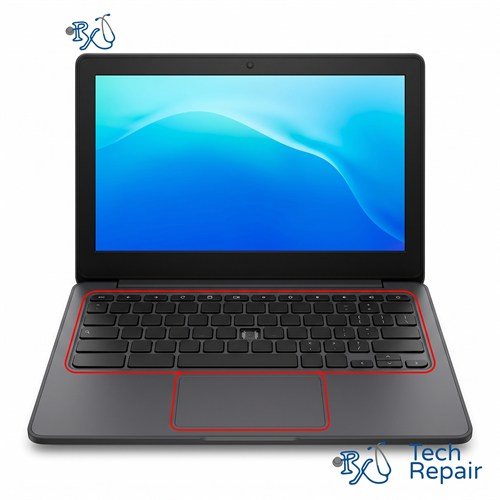
Missing keys, sticky keys, a keyboard that stopped typing, or a trackpad that won't click? RxTech Repair replaces Chromebook keyboards, palmrest assemblies and trackpads in Mission Viejo, CA for HP, Lenovo, Acer, Dell, Samsung and ASUS Chromebooks. Diagnosis is free.
Diagnosis: Free
Warranty: 1 year on parts and labor
Chromebook Keyboard Repair
Chromebook keyboards take a lot of abuse, especially on student Chromebooks. Keys get pried off, crumbs and spilled drinks make keys stick, and sometimes a whole row of keys stops working. Depending on the damage, we can sometimes reattach a key, but most keyboard problems are fixed by replacing the keyboard.
Common Chromebook keyboard problems
- Missing Chromebook keys, or keys that were pulled off and won't snap back on
- Sticky keys after a spill, or keys that feel crunchy
- Keys that don't respond, type the wrong letter, or repeat on their own
- A whole keyboard or a section of keys that stopped working
- A cracked or broken palmrest around the keyboard
Keyboard only or full palmrest assembly?
On some Chromebooks the keyboard can be replaced by itself. On others, the keyboard is riveted or heat-staked to the top case, called the palmrest, at the factory, so it can't be swapped alone. For those, we replace the whole palmrest assembly, which comes with a new keyboard and trackpad already installed. The good news is that it also replaces a cracked or worn palmrest and broken hinge mounts on models where the hinges attach to the top case.
Chromebook keyboard and trackpad replacement prices
| Repair | Price |
| Keyboard only | $99 |
| Trackpad only | $99 |
| Full palmrest assembly with new keyboard and trackpad | $129 |
Diagnosis is free, and we'll tell you which repair your Chromebook needs before any work.
Chromebook Trackpad Replacement
We also repair Chromebook trackpads (touchpads) that don't click, don't respond, or move the cursor erratically. Sometimes the fix is as simple as reseating a loose cable. If the trackpad itself has failed, we replace it.
Is your trackpad raised or hard to click? That's often caused by a swollen battery pushing up from underneath, not by the trackpad itself. Stop charging your Chromebook and bring it in. See Chromebook battery replacement for more on swollen batteries.
Try these first
- Restart your Chromebook. A frozen keyboard or trackpad is sometimes a software problem.
- Sign in as a guest. If the keyboard works there, a setting or extension in your account may be the cause.
- Test the keys in the Diagnostics app. On newer versions of ChromeOS, the Diagnostics app (search for "Diagnostics" in the launcher) includes a keyboard test that shows which keys are registering.
- If you spilled something on the keyboard, turn the Chromebook off right away and see our Chromebook water damage repair page.
Keyboard Replacement for Every Chromebook Brand
We replace keyboards and trackpads on HP Chromebook 11, 14 and x360 models, Lenovo 100e, 300e and 500e student Chromebooks, Acer Chromebook Spin, 311, 314 and 315 models, Dell Chromebook 11 (3100 and 3110) models, and Samsung and ASUS Chromebooks. See every Chromebook brand we repair.
How to Get Your Chromebook Repaired
In store in Mission Viejo
Bring your Chromebook to RxTech Repair at 27001 La Paz Road Suite 402B, Mission Viejo, CA 92691. Diagnosis is free, and we'll give you a price before we start any work. We serve all of South Orange County, including Lake Forest, Laguna Hills, Laguna Niguel, Aliso Viejo, Rancho Santa Margarita, Ladera Ranch, San Juan Capistrano, Coto de Caza and Irvine. Call or text (949) 903-6452 to schedule.
Mail-in from anywhere in the US
Call, text or contact us with your Chromebook's make and model for a quote, then ship it to us using our shipping instructions. We'll fix it and ship it back to you by standard shipping for free.
Warranty
Every Chromebook repair comes with a 1-year limited warranty on the parts we install and our labor. See our warranty page for details.
Schools, businesses and organizations
We repair Chromebooks in bulk for schools, businesses and organizations. Call (949) 903-6452 or email info@rxtechrepair.com to set up a quote.
Other Chromebook Repairs
 Screen Repair & Replacement$99 - $249Cracked screen, broken LCD, lines, black display or a touch screen that stopped working.
 Charging Port Repair$99 modular portsUSB-C or DC jack ports that are loose, broken or won't charge.
 Battery Replacement$99 - $129Won't hold a charge, dies when unplugged, or a swollen battery.
 Keyboard & Trackpad Replacement$99 - $129Missing or sticky keys, dead keyboard, or a trackpad that won't click.
 Hinge & Frame Repair$129 hinge onlyBroken hinges, cracked casing, or a lid that won't open or close.
 ChromeOS Recovery & Software$79"ChromeOS is missing or damaged," boot loops, and slow Chromebooks.
 Water Damage RepairFree diagnosisWater, coffee, juice or soda spilled on your Chromebook.
See all of our Chromebook repair services.
Frequently Asked Questions
Can you replace just one missing key on a Chromebook?
Sometimes. If the key's clip and the post underneath aren't broken, the key can often be put back on. If they're broken, the fix is a new keyboard ($99) or, on Chromebooks where the keyboard is built into the palmrest, a new palmrest assembly ($129). Bring it in and we'll check for free.
Do I need just a keyboard or a whole palmrest?
It depends on how your Chromebook is built. On some Chromebooks the keyboard can be replaced by itself for $99. On others, the keyboard is riveted or heat-staked to the top case (the palmrest) at the factory, so we replace the whole palmrest assembly with a new keyboard and trackpad for $129. That also fixes any cracks in the palmrest.
My Chromebook trackpad is raised and hard to click. What's wrong?
A trackpad that's raised, uneven or hard to click is often a sign of a swollen battery pushing up from underneath. Stop charging the Chromebook and bring it in. We'll check the battery and replace it if it's swollen.
How much does a Chromebook keyboard replacement cost?
A keyboard-only replacement is $99, a trackpad replacement is $99, and a full palmrest assembly with a new keyboard and trackpad is $129. Call or text (949) 903-6452 with your model number and we'll tell you which one your Chromebook needs.