


Chromebook Hinge & Frame Repair
Broken Chromebook hinge, cracked casing, or a lid that won't close? RxTech Repair repairs Chromebook hinges, back covers and housings in Mission Viejo, CA for HP, Lenovo, Acer, Dell, Samsung and ASUS Chromebooks. Diagnosis is free.
Diagnosis: Free
Warranty: 1 year on parts and labor
Chromebook Hinge Repair
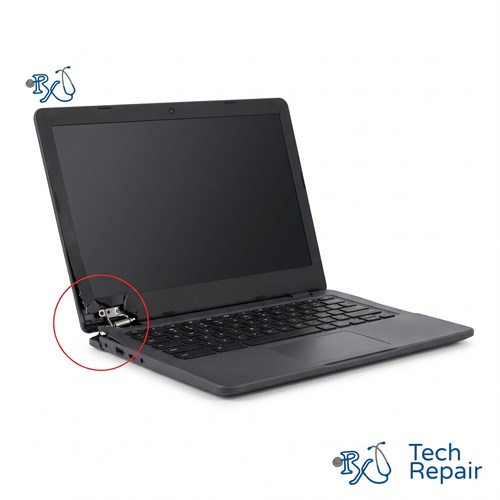
Budget plastic Chromebooks, especially many Acer, HP and Lenovo models, are known for broken hinges. The metal hinges are strong, but they're screwed into small brass inserts set in the plastic case. Over time, opening the lid from one corner or carrying the Chromebook by its screen pulls those inserts loose or cracks the plastic around them.
Signs of a broken Chromebook hinge or frame
- The hinge has pulled away from the case, or you can see the hinge through a crack
- The screen bezel or back cover is separating from the lid
- The lid wobbles, flops back, or won't stay open at an angle
- The Chromebook lid won't close all the way, or is stiff and creaks
- The screen flickers or goes black when you move the lid
- A cracked or broken bottom case, corner or back cover
Stop opening it all the way
Once a hinge mount breaks, every open and close puts uneven pressure on the screen and the display cable that runs through the hinge. Keep using it that way and a hinge repair can turn into a Chromebook screen replacement. Open the lid gently from the middle, and bring it in as soon as you can.
What we repair
- Hinges: bent, stiff or snapped hinges are replaced with hinges made for your model.
- Back cover (lid) replacement: when the hinge inserts have pulled out of the lid, we replace the back cover so the hinges mount securely again.
- Bottom case or palmrest: on models where the hinges mount into the base, we replace the part they attach to. On many Chromebooks this is the palmrest with the keyboard built in.
- Bezels, hinge covers and corners: broken trim pieces and cracked corners.
- Display cable: if a broken hinge has damaged the screen cable, we replace it so the picture stays steady.
Chromebook hinge repair price
| Repair | Price |
| Hinge only | $129 |
| Back cover, bottom case, palmrest or display cable | Quote by model |
Diagnosis is free, so we'll check everything around the hinge and give you the full price before any work.
Hinge Repair for Every Chromebook Brand
We repair hinges and housings on Acer Chromebook 311, 314, 315 and Spin models, HP Chromebook 11, 14 and x360 models, Lenovo 100e, 300e, 500e and Flex Chromebooks, Dell Chromebook 11 (3100 and 3110) models, and Samsung and ASUS Chromebooks. See every Chromebook brand we repair.
How to Get Your Chromebook Repaired
In store in Mission Viejo
Bring your Chromebook to RxTech Repair at 27001 La Paz Road Suite 402B, Mission Viejo, CA 92691. Diagnosis is free, and we'll give you a price before we start any work. We serve all of South Orange County, including Lake Forest, Laguna Hills, Laguna Niguel, Aliso Viejo, Rancho Santa Margarita, Ladera Ranch, San Juan Capistrano, Coto de Caza and Irvine. Call or text (949) 903-6452 to schedule.
Mail-in from anywhere in the US
Call, text or contact us with your Chromebook's make and model for a quote, then ship it to us using our shipping instructions. We'll fix it and ship it back to you by standard shipping for free.
Warranty
Every Chromebook repair comes with a 1-year limited warranty on the parts we install and our labor. See our warranty page for details.
Schools, businesses and organizations
We repair Chromebooks in bulk for schools, businesses and organizations. Call (949) 903-6452 or email info@rxtechrepair.com to set up a quote.
Other Chromebook Repairs
 Screen Repair & Replacement$99 - $249Cracked screen, broken LCD, lines, black display or a touch screen that stopped working.
 Charging Port Repair$99 modular portsUSB-C or DC jack ports that are loose, broken or won't charge.
 Battery Replacement$99 - $129Won't hold a charge, dies when unplugged, or a swollen battery.
 Keyboard & Trackpad Replacement$99 - $129Missing or sticky keys, dead keyboard, or a trackpad that won't click.
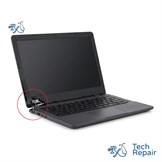 Hinge & Frame Repair$129 hinge onlyBroken hinges, cracked casing, or a lid that won't open or close.
 ChromeOS Recovery & Software$79"ChromeOS is missing or damaged," boot loops, and slow Chromebooks.
 Water Damage RepairFree diagnosisWater, coffee, juice or soda spilled on your Chromebook.
See all of our Chromebook repair services.
Frequently Asked Questions
Why do Chromebook hinges break?
On many budget Chromebooks, the metal hinges are screwed into small brass inserts set in the plastic case. Opening the lid from one corner, or carrying the Chromebook by its open screen, puts stress on those inserts until they pull out or the plastic around them cracks.
Is it safe to keep using a Chromebook with a broken hinge?
It's best not to. A broken hinge mount puts uneven pressure on the screen and the display cable every time you open or close the lid, which can crack the screen or cause flickering. Repairing the hinge early usually costs less than fixing a screen later.
How much does Chromebook hinge repair cost?
A hinge-only repair is $129. If the back cover, bottom case or palmrest that the hinges mount into is also broken, we'll quote that part by model. Call or text (949) 903-6452 with your model number.
My Chromebook screen flickers when I move the lid. Is that the hinge?
It can be. The display cable runs through the hinge area, and a damaged hinge or cable can make the screen flicker or go black at certain angles. We test the screen, cable and hinges to find the cause.