


MacBook Pro 13" 2016-2017 (2 Ports) macOS Reinstall
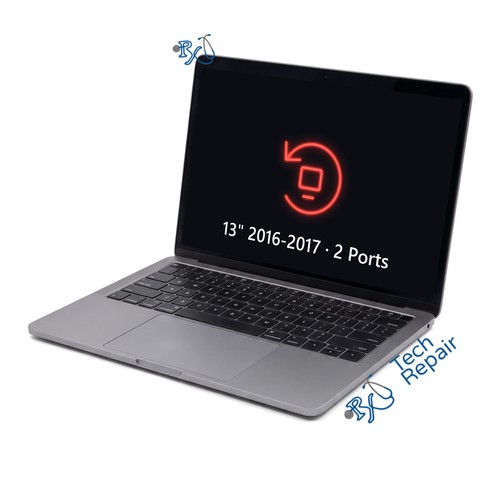
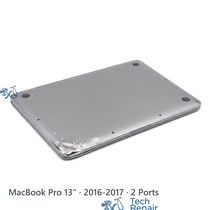
Model Numbers: A1708 (printed on the bottom case)
Turnaround: 1-2 hours, same day in Mission Viejo, CA
Availability: Available now
MacBook Pro 13" 2016-2017 (2 Ports) macOS Reinstall Description
If your MacBook Pro 13-inch (2016 or 2017, Two Thunderbolt 3 ports) won't start up, is stuck on the Apple logo or a progress bar, shows a folder with a question mark, or is so slow and full of errors that it's hard to use, a clean macOS reinstall often fixes it. We back up your files first if the drive can still be read, check the drive, reinstall the newest macOS your Mac supports from Apple's servers or a USB installer, install the updates and set up your account. If the drive itself is failing, we'll tell you before going further.
What this service helps with:
- Mac stuck on the Apple logo or a progress bar
- Folder with a question mark at startup
- Very slow, freezing or full of errors
- Getting the Mac ready to sell or give away
Ship your MacBook Pro to us from anywhere in the US!
Simply buy the repair using a credit card or PayPal using the button above, ship your Mac to us, and we'll take care of the rest! We cover return shipping to you for free via standard shipping. If you need expedited 2-day return shipping, you have that option above for an additional fee.
Get your MacBook Pro repaired in Orange County, CA!
For this repair plan on 1-2 hours, same day. Feel free to come to our storefront in Mission Viejo if you are close by. An appointment is recommended.
Let our experienced technicians fix your device.
Our technicians have done over 30,000 repairs, so your MacBook Pro is in good hands.
Find Out Which Mac You Have
The MacBook Pro 13" 2016-2017 (2 Ports) is Apple's MacBook Pro 13-inch (2016 or 2017, Two Thunderbolt 3 ports). Its model number is A1708. It comes in Silver and Space Gray and has a row of function keys with a plain power key at the top right (no Touch Bar), two USB-C ports on the left and the headphone jack on the right, speaker grilles on both sides of the keyboard and the flat butterfly keyboard.
Option 1: Check About This Mac
If your Mac turns on, choose Apple menu > About This Mac. It should say MacBook Pro (13-inch, 2016, Two Thunderbolt 3 ports) or MacBook Pro (13-inch, 2017, Two Thunderbolt 3 ports).
Option 2: Mac won't turn on?
Turn it over: the model number (A1708) is printed in small text on the bottom case. You can also bring it to our shop and we'll identify it for you.
Two ports or four?
Count the USB-C ports: two (both on the left) or four (two on each side). Same-year models with two and four ports use different parts, so the count matters.
Another MacBook Pro?
Check the model number on the bottom case: MacBook Pro 13" M1 / M2 (2020-2022) is A2338; MacBook Pro 13" Intel 2020 (4 Ports) is A2251; MacBook Pro 13" Intel 2020 (2 Ports) is A2289; MacBook Pro 13" 2019 (2 Ports) is A2159; MacBook Pro 13" 2018-2019 (4 Ports) is A1989; MacBook Pro 13" 2016-2017 (4 Ports) is A1706; MacBook Pro 13" Retina (2013-2015) is A1502; MacBook Pro 13" Retina (2012-2013) is A1425. Parts differ between models, so use the page that matches your Mac. For 2008-2012 models, see our MacBook Pro 2008-2012 repairs.
If your Mac isn't a MacBook Pro 13" 2016-2017 (2 Ports), see our MacBook Pro repair page or call or text us at (949) 903-6452 and we'll help you figure it out.
MacBook Pro 13" 2016-2017 (2 Ports) macOS Reinstall FAQ
How much does a MacBook Pro 13" 2016-2017 (2 Ports) macOS Reinstall cost?
The MacBook Pro 13" 2016-2017 (2 Ports) macOS Reinstall at RxTech Repair is $99. Mail-in repairs include free standard return shipping.
How long does a MacBook Pro 13" 2016-2017 (2 Ports) macOS Reinstall take?
This service takes 1-2 hours, same day at our Mission Viejo, CA shop, or after your Mac arrives for mail-in.
Can I mail in my MacBook Pro 13" 2016-2017 (2 Ports) for repair?
Yes. Buy the repair on this page, ship your MacBook Pro to RxTech Repair from anywhere in the US using USPS, UPS or FedEx, and we'll repair it and ship it back to you. See our shipping directions.
What does the MacBook Pro 13" 2016-2017 (2 Ports) macOS Reinstall fix?
It reinstalls macOS cleanly, so the Mac starts up and runs normally again.
Will I lose my data?
A clean reinstall erases the drive, so we back up your files first whenever the drive can still be read, and put them back afterwards. If the drive can't be read, we'll tell you before erasing anything.
Which Mac does this repair fit?
This repair is for the MacBook Pro 13-inch (2016 or 2017, Two Thunderbolt 3 ports), model number A1708. To check yours, choose Apple menu > About This Mac, or look for the model number printed on the bottom case.